09. Permission
An Agent Can't Touch the World Directly: The Six-Step Permission Chain and Deleting Bash
The last post equipped the writing agent with a toolbox — it can genuinely read and write files, publish a piece. But tools cut both ways: the ability to read and write files also means the ability to touch things it shouldn't. So this post picks up right where that left off: permissions, and how every single tool call gets framed.
🪧 Lock It Inside an Authorized Directory — Is That Enough?
Have the user authorize one local directory, keep the agent locked inside it, only allowed to read and write things in that directory — sounds pretty safe, right?
That's not a wrong idea — it's necessary — but it's also nowhere near sufficient. A few cases it doesn't cover: what if there's a .env file sitting in that directory, hiding some other key? The agent needs to search online, needs to push a finished piece to Mowen — these "reaching outward" actions were never going to be contained by "locked inside a directory," because their entire point is to cross outside that directory, even outside this machine entirely.
So "restrict the directory" is one gate, not the whole system. For an agent to interact safely with the real world, it needs a complete security system. This post takes that system apart, and covers how, in this particular vertical — writing — I traded safety for capability through subtraction.
🧭 The Core Idea: An Agent Can't Touch the World Directly — There Has to Be a Gate in Between
Today's models are genuinely smart, but they're not fully trustworthy: they can get "injected" with bad instructions hiding in some external text you pasted in, or they can just misjudge on their own. So every step where the agent acts on the real world — which file it reads, which it edits, where it sends something — needs a gate between intention and action. This is exactly what the Claude Code Harness Book has an entire chapter on: why an agent can't touch the world directly.
Let's look at what gates the SDK itself provides, then at how I used them for this vertical — writing.
🔩 Claude Code: What a Genuinely Complete Permission System Looks Like
First, Claude Code's own permission-and-approval system — it's the foundation everything I customized and subtracted from is built on. The third post in the Learn Claude Code source-walkthrough series takes the permission mechanism apart in detail. Roughly, it breaks into three categories — here's the plain-language version:
One is tool allow/deny lists. You can list an "auto-approve" allowlist (allowedTools), or a "always reject" denylist (disallowedTools); either list can go as granular as a specific usage of a specific tool — say, "Bash is allowed, but rm inside Bash is always rejected."
Two is permission modes — a few presets that switch the overall strictness with one flag: default (ask when it should ask), acceptEdits (auto-approve file edits inside the workspace, for convenience), plan (look only, don't touch), and the loosest, bypassPermissions (nearly everything auto-approved — very dangerous).
Three is interactive approval. When a tool is neither auto-approved by the allowlist nor blocked outright by the denylist, Claude Code pops up a prompt right there and asks you, and you can pick "allow this once / always allow / deny." Those "should this command be allowed to run" prompts you see using Claude Code in the terminal — that's this layer.
Keep one premise in mind, though: this whole system was built for general-purpose coding. Its default toolset is broad — including the "master key" Bash I kept bringing up last post (a real necessity for coding: running scripts, installing dependencies) — and its default mode leans toward "let it run." That broad default, carried over unchanged into a writing context, becomes excess capability, and real risk.
🛠 The SDK: Every Tool Call Runs Through a "Six-Step Evaluation Chain"
The SDK builds permissions as a strictly ordered evaluation chain. Every single time the model wants to call a tool, it runs the whole chain from the top:
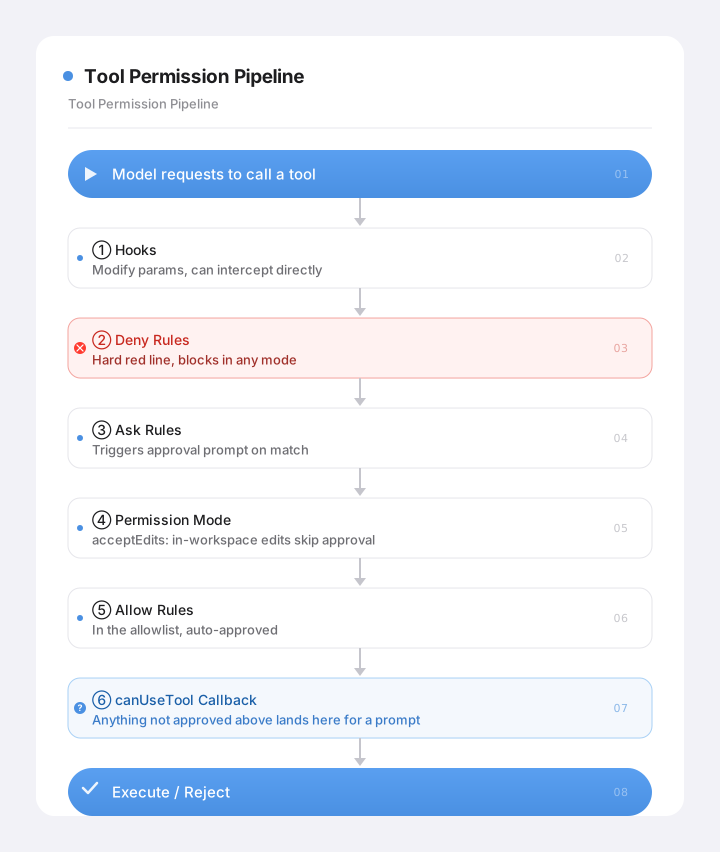
Called "six steps," but unpacked, it's really this sequence of gates, ordered deliberately — the earlier a gate sits, the higher its priority. Three points here are key to understanding the whole system:
- Deny is a hard limit — even the "highest privilege" setting can't get past it. There's a mode called
bypassPermissionsthat skips permission-mode and Allow-list approval, but it does not skip deny rules, and it does not skip Hooks or Ask rules. Any truly non-negotiable line has to be written into deny. - Once a tool is on the "Allow list," it never reaches the final
canUseToolstep at all. Hitting Allow means immediate approval — it never gets anywhere near that last "pop up and ask" callback. - That final
canUseToolcallback is where the "ask the user" step actually lives. It pauses execution and waits for your answer: approve (you can even tweak the tool's input arguments on the way through), or deny (with a reason sent back to the model, so it can try something else). Any tool that made it past every earlier gate unapproved lands here, and the call is yours.
Keep these three points in mind — they're the load-bearing logic behind all the customization below.
✂️ What SmartWriter Does: The Sharpest Cut First — Make Dangerous Actions Impossible to Even Attempt
Applying this evaluation chain to a writing agent touches four layers of configuration, but I want to cover the most important one first, because it carries the single idea I most want this post to leave you with:
The highest form of security isn't "block more" — it's "make the dangerous action not exist in the first place."
Blocking is reactive — you have to anticipate every bad scenario and write a rule to catch it, and miss just one and something goes wrong. Making an action incapable of happening at all is proactive, and it solves the problem once, permanently. Sounds a bit abstract, but for this product, it came down to one extremely specific, extremely blunt decision.
Layer one: delete Bash entirely.
Not restrict it, not pile on a stack of deny rules — remove it from the toolset completely, so the model never even knows it exists. What does a writing agent need a master key that runs any system command for? It doesn't. And Bash happens to be the single largest injection attack surface on the whole agent — the most dangerous path of all, "get the model to run a script, and from there, touch system files." Delete it, and that entire category of risk simply stops being possible — no need to rack your brain trying to block it, because the door was never there to begin with.
With Bash gone, the main writing toolset narrows down to read, write, edit, search (Read/Glob/Edit/Write/Grep) — that's it, plus the handful of controlled, purpose-built tools from post 8. Whenever a deterministic operation is needed, I reach for a dedicated custom tool instead of a general-purpose shell — and that's exactly where last post's "don't let the model talk its way through it" and this post's "delete Bash" meet.
🧱 What SmartWriter Does: Welding On the Remaining Layers — Boundaries, Hard Limits, Approval
With Bash gone, three more layers of configuration round it out:
Layer two: cwd is the boundary. The elegant part of acceptEdits is that its "no approval needed" only applies to edits inside the working directory — the moment the model wants to touch something outside that directory, it still triggers an approval prompt. So all I have to do is set each writing task's working directory correctly, and the agent is naturally fenced in. For a single task, that working directory is its own task folder; for a task inside a collection, it's the collection's subdirectory (so it can read the collection's profile, memory, and sibling articles — genuine continuity across the series — but can't read into any other collection).
📐 Going deeper · "locked inside a directory" blocks writes, not reads
acceptEdits— "edits inside the working directory need no approval, edits outside do" — sounds like an airtight wall. But it has a gap: it governs "editing" (Write / Edit), not "reading" (Read). Which means if the model grabs an absolute path andReads a file outside the directory (another task's, even something under the user's home directory),acceptEditsdoesn't stop that at all.In other words, "cwd is the boundary" holds strictly for "write," but doesn't fully hold for "read." Locking reads down too doesn't come from the permission mode — it comes from the very first gate in the evaluation chain, the PreToolUse hook (I named mine
path_guard): it checks the path before the tool actually runs, and any out-of-bounds Read gets caught right there.A permission mode is a convenience gate, not an isolation wall. Real isolation has to be hand-welded with a hook.
Layer three: deny as a backstop, plus a hook allowlist. With the directory boundary in place, sensitive files inside that same directory still need protecting. I use explicit deny rules to reject dangerous operations outright — hit .env, .ssh, any private key file, and it's rejected, and rejected in the kind of way that not even bypassPermissions can get around. Finer-grained path validation happens in the very first gate of the chain, Hooks (exactly how that works is the subject of the next post — I'll leave the detail there for now).
Layer four: two categories of action require mandatory approval. Two kinds of operations, I decided, shouldn't be allowed to auto-approve — the user has to explicitly say yes:
- Anything that spends real money: web search and page fetching (
WebSearch/WebFetch) get expensive at scale, so crossing a set token threshold triggers a prompt asking for consent (you can pick "allow this once" or "always allow for this task"). - Anything sending data outward: publishing a piece to Mowen, for instance — irreversible, and touching privacy — also requires explicit confirmation.
And how does "mandatory approval" actually get implemented? The answer's hiding in point 2 from the section above: just don't put these two categories of tool on the Allow list. Never getting onto Allow means they can't be auto-approved, so naturally, every single time, they fall all the way through to that final canUseTool callback — which is exactly the approval card popping up. No extra "approval logic" needed at all — this just leverages the ordering of the evaluation chain, letting whatever needs asking fall "naturally" into the step that asks. Using the mechanism's own ordering to express intent, instead of hardcoding a pile of if-branches, felt different from how I'd usually approach backend logic — a small takeaway from this part of the build.
📐 Going deeper · what actually happens under the hood at "pop up and ask the user"
That
canUseToolcallback is a lot more sophisticated than just "showing a popup." Once triggered, it pauses the entire execution, hands the tool name and arguments over to the user, and waits for a response. Two possible outcomes: approve, optionally editing the arguments on the way through (say, tightening a file path the model provided down into a sandbox before letting it proceed), or deny, with a reason attached — that reason gets sent back to the model, so it can try a different approach instead of just hitting a wall.Even better: this callback can wait indefinitely. The SDK supports this natively, and it's genuinely useful for a desktop app: a user sends an instruction, gets up to make tea, and comes back a while later — the call just sits there suspended, and picks up right where it left off from the persisted session, whenever they return, or the next time they open the app. Nothing lost. That said, in practice I still added a timeout backstop, so things don't hang forever if a user just forgets to respond.
"Approval" isn't just a security gate — it's also a genuine handoff point in human-agent collaboration: the model lays out "here's what I want to do, and here are the arguments," and the user decides whether to allow it, or adjust it. What that approval card actually looks like, and how it shares a UI with "a clarifying question the model asks you," gets covered in detail in post 14, on the UI.
🔧 Gotcha · never take the shortcut of adding a mandatory-approval tool to the Allow list
This one's the mirror image of the mechanism above, and it's an easy one for anyone to slip on. During development, trying to get online research running smoothly, I added
WebSearchstraight to the Allow list, just to stop it from popping up constantly. It immediately fired off dozens of web searches and fetches back to back, burning through tokens fast. Caught it in time and killed the run, thankfully.Worth remembering: the moment a tool lands on Allow, it gets auto-approved at step 5 of the evaluation chain, and it never reaches step 6 — the approval callback — ever again.
⚖️ Where This Gets Vertical: Generic Chases "Can Do Anything," Vertical Chases "Can't Do Anything Dangerous"
Same comparison as always, to close this out:
⚖️ The tradeoff · the same permission system, two very different ways of living
A generic agent SmartWriter Why Toolset Ships the full set, aiming for "can do anything" Narrowed to read/write/edit/search + purpose-built tools, Bash deleted Writing doesn't need a general-purpose shell — delete it, and an entire risk category disappears Safety philosophy Add a rule to block it once a problem shows up Make the dangerous action "not exist" in the first place Subtraction is more reliable than "trying to block everything" — it doesn't depend on your own thoroughness Risky / outbound actions Often auto-approved for convenience Kept off the Allow list on purpose, forced through approval Spending money, sending data out — both irreversible, both need a human nod
A generic agent's pride is "I can do anything." Building for this vertical — writing — my choice runs in the exact opposite direction: "there's nothing dangerous I'm capable of doing." A writing agent's value is in helping you write well, not in whether it can run scripts or touch the system — those capabilities are pure liability and risk for it. Through deliberate self-restriction, cutting away everything that isn't actually used, what's left is narrow, and safe.
The subtraction in this post, for safety's sake, rhymes with post 5's — customizing the system prompt and stripping out the coding persona. Maybe they're two expressions of the same underlying belief: building for a vertical means being willing to cut away, one piece at a time, everything the generic world offers that "looks complete" but you'll never actually use.
Alright, that closes out permissions. If you've been paying close attention, you may have noticed I skipped over the gate sitting at the very, very front of that chain — Hooks — and I still owe the detail on "how does the path allowlist actually work." I saved that gate for last on purpose, because it deserves its own dedicated post.
It isn't just the first gate in the permission chain — it's the all-purpose hook for "inserting your own logic into how the agent runs" — injection, backstops, interception. A lot of the "more on this later" moments scattered through earlier posts are hiding inside it. Next post, we take Hooks apart. Let's keep going.