11. Plan Mode
Plan Before You Act: Writing's "Option C"
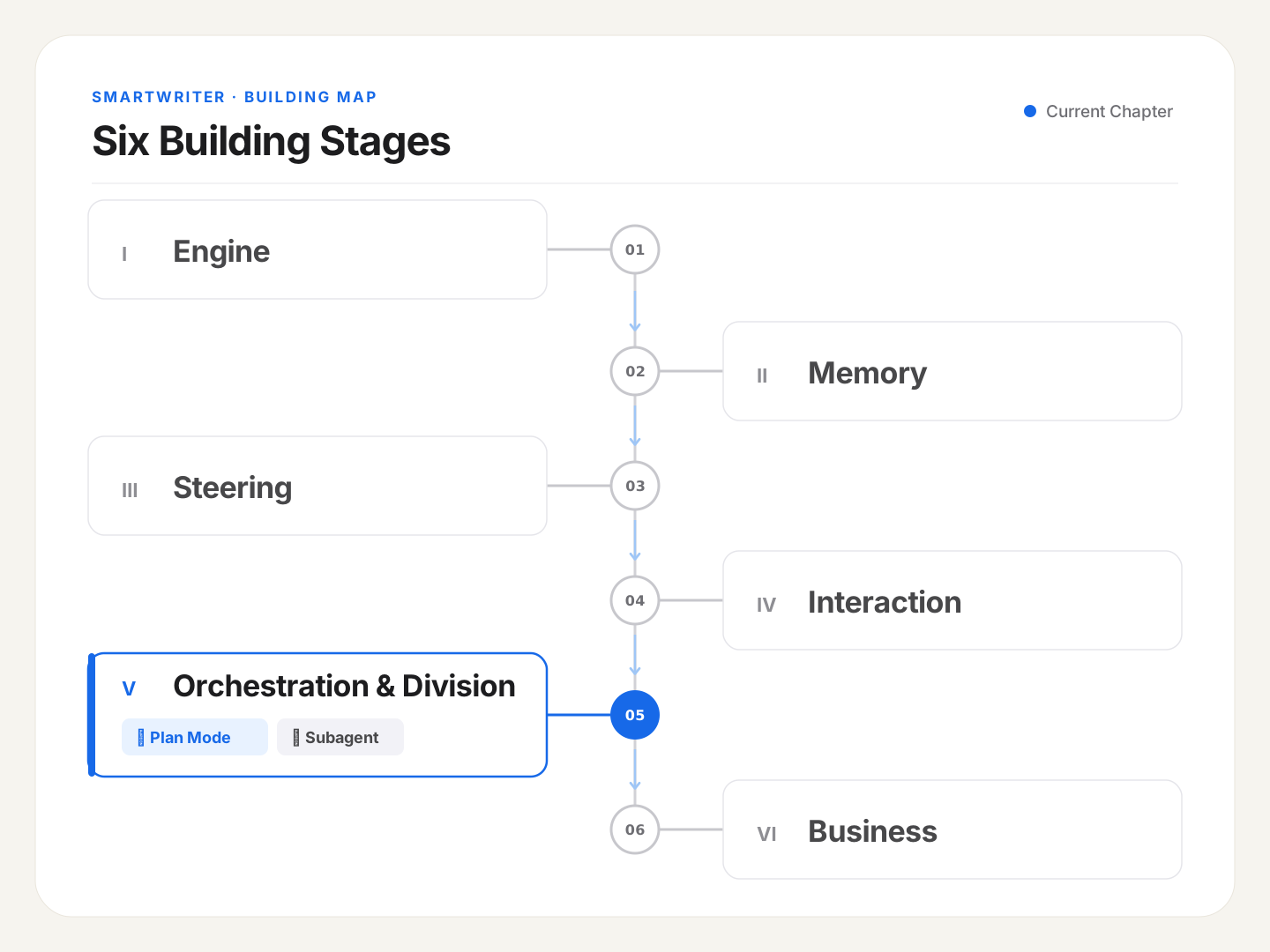
The last four sections covered how a single agent does "one thing at a time" well: it can run (Engine), remember things (Memory), has a persona and a methodology (Steering), and can safely touch the real world (Interaction). All of that quietly assumed one thing: "one agent, start to finish." But hit a structurally complex writing task, and that assumption can stop holding — you need a higher layer of organization. This post starts from "plan before you act," and walks through why I ended up building a custom solution instead of using what was already there.
🪧 A Complex Long-Form Piece Is Better Thought Through Before You Start Typing
I tried the shortcut once — had the agent write a deeply researched, fact-heavy technical piece in one go. It didn't hesitate, just started grinding away from paragraph one. About halfway through, I noticed something had gone wrong: the content had drifted off topic, and several sections were repeating themselves. Fixing it at that point meant starting over — every token, every minute, gone.
A human writing something this complex wouldn't work this way. They'd sketch an outline first — settle the thesis, the structure, a few key arguments and where the supporting research needs to come from — maybe even sync with an editor to confirm the direction is right, before writing a single sentence. That's plan before you act.
A writing agent should work the same way. For long, structurally complex pieces where direction is easy to get wrong, "produce a plan first, confirm it, then act" is a much better deal than "just start writing, and fix it after it goes wrong." That "plan before you act" mechanism is the star of this post: Plan Mode.
🧭 The Core Idea: Plan Mode = Explore First, Produce a Plan, You Confirm, Then Act
What Plan Mode does is split one task into two phases:
- Planning phase: the agent does read-only exploration — reads your material, checks your profile, works out how the piece should be structured — then produces a plan for you to review. During this phase, it doesn't touch your piece at all.
- Execution phase: once you've reviewed the plan and given a nod (or made a few edits), the agent enters actual writing mode.
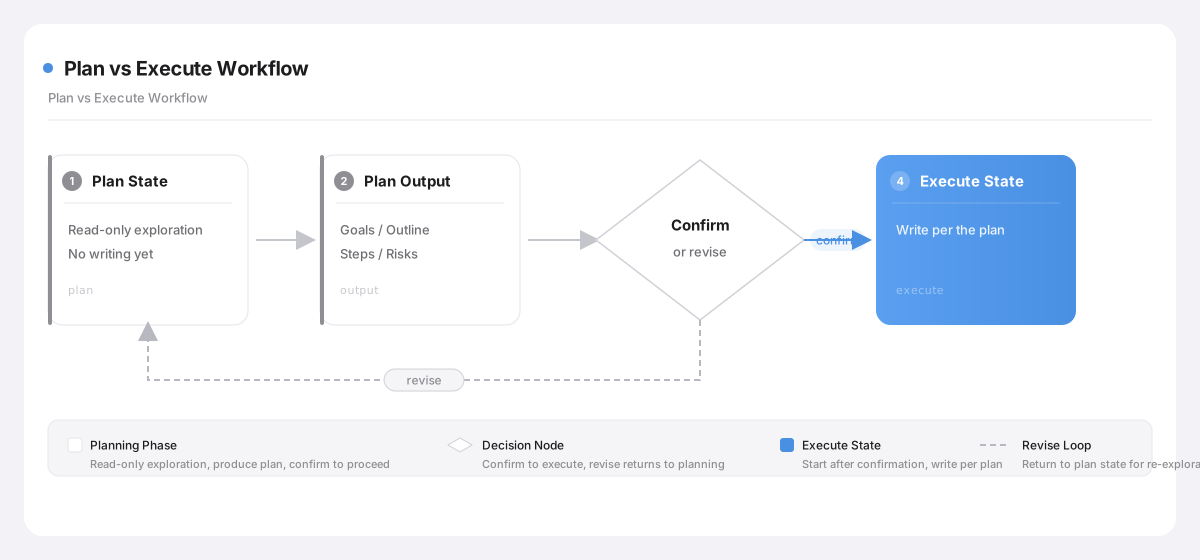
Zoomed out, this is a classic fork in agent design: one path is "think as you go" — take one step, see what happens, adjust — well-suited to tasks where mistakes are cheap and easy to correct on the fly. The other is "think it all through first" — split exploration and execution into two phases, with a checkpoint in between. Coding has something similar, and writing is no exception. Tasks where "one wrong step means tearing everything down after" — a complex long-form piece is exactly that — naturally fit the second path better.
That checkpoint between the two phases, "you confirm," is exactly where human-in-the-loop lives: it pulls the single most critical, most error-prone judgment call — "is this direction right?" — forward, to before anything gets written, instead of discovering the piece went completely sideways only after a huge draft is already done.
Think of it like a home renovation: you get the design drawn up, the homeowner signs off, and only then does construction start — you don't revise the blueprint mid-build, wall already up. Tearing down one wrongly-built wall costs a lot more than revising a drawing. In writing, "a long, badly-drifted draft" is the equivalent of that wrongly-built wall.
But not every writing task deserves this much ceremony. A social media caption, a twenty-word tweak — there's no need to produce a plan and get it confirmed first; adding that extra step is pure overhead. Plan Mode earns its place for the pieces where direction is easy to get wrong, and getting it wrong is expensive.
Worth mentioning: the planning phase pairs particularly well with
AskUserQuestion(the clarification tool from post 5). Right after the agent finishes exploring and is about to settle on a plan is exactly the moment it should turn around and ask you something like "do you want this piece sharper, or gentler in tone?" — nailing down the key questions here is what makes the eventual execution trustworthy.
🔩 Claude Code: A Plan Mode Purpose-Built for Coding
This "plan before you act" idea isn't something I invented — Claude Code has a native implementation of it, and I use it myself constantly for complex vibe-coding tasks.
Per the official description, in Claude Code's plan mode, "Claude reads files, runs commands to explore, and produces a plan — but doesn't touch your source code." The implementation detail is genuinely thoughtful too: when exploration wraps up, Claude doesn't silently switch state on its own — it calls a tool named ExitPlanMode, specifically to request "I'd like to exit plan mode, please approve this," and only once you confirm with a keypress in the terminal does it actually start changing code. Once confirmed, that plan gets handed off to TodoWrite, broken into checkable tasks that get ticked off as execution proceeds. The fifth post in the Learn Claude Code source-walkthrough series covers the relationship between TodoWrite and the planning flow — genuinely useful for understanding this mechanism.
Sounds close to what I wanted — read-only exploration, nothing written — right? But the devil's in the operational detail. Its "plan" is really a code-change plan, written into a dedicated file (a markdown under ~/.claude/plans/); its "confirmation" is a keypress in the terminal, targeted at ExitPlanMode; its "output" is going straight into code changes once plan mode exits. This whole experience is, down to its bones, purpose-built for the scenario of "one person watching a terminal, reviewing and nodding along." And it's exactly that deep coding DNA that becomes the root of the trouble below.
🛠 The SDK: plan Is Just a permission_mode
Things change at the SDK layer. The SDK essentially strips the UI off Claude Code's capabilities, so developers can orchestrate them inside their own app instead of being tied to one terminal window. The ceremony of "confirm with a keypress" in the terminal is gone; the dedicated ExitPlanMode tool is gone too. Plan gets compressed here into a plain enumeration value: one of the permission modes (permission_mode). Remember those six modes from post 9 — default / acceptEdits / plan / auto / dontAsk / bypassPermissions? Plan is one of them.
Switch the permission mode to plan, and the agent enters that "read-only exploration, write a plan, don't touch source" state. It's a session-level setting (bound when the client is created), but it also supports switching at runtime (say, sending a prompt with a /plan prefix).
Worth calling back to post 7 here: I said back then that "every command eventually resolves to a Skill." /plan is the exception — it's not a Skill. The reason lives in what it fundamentally is: commands like /polish are, at their core, methodology injection (triggering a how-to-write manual, a SKILL.md). /plan, at its core, is a runtime-mode switch (flipping the entire agent into a "read-only exploration" state). One hands it a writing method; the other changes what mode it's operating in — fundamentally different things. Which is why, in the actual build, every other command converged into a Skill, and /plan alone stayed a permission-layer concern, on its own path.
Going from Claude Code to the SDK is a genuine downgrade in dimensionality: the UI is stripped away, leaving only the most essential switch underneath. But once that dimension is gone, someone has to backfill the "approval" and "landing" experience that used to belong to the terminal UI. So — building Plan Mode for a writing agent, how do you fill that gap? The obvious move is flipping permission_mode to plan, right? That's exactly what I did at first. And it went badly wrong.
🧨 Three Iterations at SmartWriter: From "Use What's There" to "Deliberately Don't"
Plan Mode went through three versions before landing, and the detour is worth walking through in full.
Version one (Option A): tightly restrict the tool list, and simulate "we're in the planning phase now" through the prompt. Workable in theory, but with real problems: restricting tools left the agent short on what it needed during exploration, so plan quality wasn't reliable; and write-protection relied entirely on the system prompt as a verbal instruction, not a hard SDK-level block — the moment the model didn't listen, there was no backstop.
Version two (Option B): use the SDK's native plan mode directly. It sailed through small-scale validation (a spike), and I briefly thought this was settled. Then it hit real end-to-end testing and fell apart completely. Because the SDK's plan mode still carries that same "write a plan to a dedicated file, execute code changes once confirmed" coding DNA at its core, and forcing that onto a writing context turned out awkward in every direction.
🔧 Gotcha · borrowing a mechanism built with "coding DNA" to do writing's job just didn't fit
Option B (the SDK's native plan mode) surfaced three problems in real testing, all traceable to that DNA baked in underneath:
- Semantic conflict, confusing enough that the agent itself got tripped up by it. Plan mode's whole mental model is "coding task," but I was asking it to write. The most telling moment: digging through the agent's own reasoning trace, I found it visibly wrestling with this, in its own words: "the plan-mode workflow is designed for code tasks, but this is a writing assignment, so I need to adapt it thoughtfully." It was spending precious tokens and time figuring out how to bend a coding mechanism into something that could handle writing — solving the wrong problem entirely.
- Uncontrolled side effects on exiting plan mode. Without the terminal's
ExitPlanModekeypress confirmation, the agent under plan mode decides on its own when exploration is "done" and exits — and that exit might casually write a file into~/.claude/plans/, polluting the user's disk, or might not, entirely dependent on what it feels like doing in the moment. That kind of unpredictable behavior isn't acceptable for a product being shipped to real users.- The plan file pointed at completely the wrong place. By default it wants to write the plan into a "code-change plan" file meant for a coding context — nothing like the "writing plan" I actually needed. And once again, the agent's own reasoning showed it visibly stuck, "running into constraint conflict."
The root of this whole mess: borrowing a ready-made mechanism built specifically "for writing code," to do writing's job, turned out awkward at every single step of implementation. The move that was supposed to save effort ended up saving none at all.
That road was a dead end, so building it myself was the only option left. What I actually needed, when you strip it down, wasn't complicated at all: during the planning phase, just don't let it touch my piece.
✂️ Option C: Leave the SDK's Mode Alone, Intercept in the App Layer Instead
That reflection is what led to Option C. Its core idea: don't switch permission_mode at all — stay in acceptEdits (the same mode used for normal writing) the entire time the plan is being formed. The "no touching the piece" protection gets handled entirely by an interception in the app layer, by me.
How, concretely? Remember the canUseTool approval callback from post 9 (built for high-frequency web access and publish approvals)? It's a perfect fit to reuse here:
- Add a flag to the task — "is this currently the planning phase" (
in_plan_phase). - Set it to true the moment the planning phase begins.
- Add one check inside the
canUseToolcallback: if it's currently the planning phase, and the model wants to callWriteorEdit, reject it immediately (a fast deny — no popup, no waiting). - Having hit that wall, the agent automatically degrades to read-only exploration —
Read,Glob,Grep, andprofile_readerfor reading the profile all still work fine.
This doesn't borrow any of the SDK's coding-plan-mode semantics at all — it just reuses a callback the project already had, with one extra check added: "don't allow writes during the planning phase." Laid out against Option B in a table, the difference is clear:
| Dimension | Option B (switch to SDK plan mode) | Option C (acceptEdits + app-layer interception) |
|---|---|---|
| Protection strength | Strong (blocked at the SDK's physical layer) | Equivalent (Write/Edit rejected the instant it's attempted) |
| Semantic conflict | Yes (plan mode carries coding DNA) | None (never triggered at all) |
| Exit side effects | Yes (might write a stray plan file) | None |
| Number of mode switches | 2 | 0 (never switches — cache-friendly) |
| Testable / controllable | A black box, hard to unit test | Application-layer code — unit-testable, deny reasons fully customizable |
So how does the plan itself actually get presented? It needs to be something you can "confirm or edit," which means it has to be structured, not free-form text — which loops right back to the "two paths" rule from the opening post: content meant for you to read goes down the free-text path; content meant to be consumed by code (rendered by the frontend into a confirmable card) goes down the structured path. I have the plan produced in a clean structure — goal, outline, steps, risks — and the frontend can render it straight into a "plan card" for the user to review. Confirm it, and it becomes a to-do list, driving the agent into execution phase, writing step by step. Throughout, the user only ever perceives two states: "planning" and "executing" — what the underlying permission_mode is called, or whether it even changed, is something they don't need to know, and shouldn't need to know.
A neat design detail: the planning and execution phases actually run on the same client, the whole way through — flipped back and forth by that
in_plan_phaseflag, set to true during planning (blocking writes), and set to false once the plan is done and execution begins (writes unblocked). No need to restart or hand off context just to switch phases — whatever material and profile got read during exploration are still right there during execution. A seamless transition.
"Becomes a to-do list" turned out to be more complicated than I first assumed. My original design had the backend pre-fill a few placeholder to-do items based on the number of steps in the plan, then update them by matching IDs as the agent executed. That hit a wall almost immediately in testing: the to-do list wasn't populating all at once — items were popping out one at a time from the first item onward; several items had empty content; the progress bar stayed stuck on the first slot no matter what.
I went through several rounds of tweaking the ID-mapping logic, each one more convoluted than the last, and the symptom never moved an inch. It wasn't until I went and read the agent's actual execution transcript that I found the real cause: the to-do list is actually an SDK-native mechanism — every time the agent calls it, it gets back a confirmation message. My parsing code had assumed, without checking, that this confirmation was a JSON object, and was written on that assumption — but looking at the real transcript, what the CLI actually returned was a plain sentence (something like "Task #3 created successfully"), not JSON at all. The parsing function failed on that every single time, returning empty, and the to-do items naturally never lined up.
🔧 Gotcha · the root of the to-do-list bug was writing code without ever checking the real data
This one took four full rounds of "fixes" before I actually found the root cause — every round stayed stuck at the symptom layer, tweaking the ID-matching logic, without ever going back to verify what format the SDK actually returns: the illustrative structure in the official docs and what the CLI actually spits out turned out to be two completely different things. The test suite stayed green the whole time too, because the tests were written against JSON I'd fabricated myself — verifying something that never existed.
Once the root cause was actually found, the fix wasn't hard at all: use a regex to pull the task ID out of that plain sentence, and demote JSON parsing to a fallback path. The biggest lesson here: whenever you hit a detail like "what should the SDK actually be returning," don't trust the docs' illustrative diagram — go read an actual execution transcript. That's the only real ground truth.
Once that was fixed, everything downstream fell into place: the to-dos the agent itself creates are the single source of truth, and the backend does an honest pass-through — no need to guess how many it'll create, no need to race ahead and pre-fill placeholders. However many steps the plan lists, the agent isn't obligated to follow that exactly during execution — it's free to merge or split steps based on what actually makes sense as it goes.
📐 Going deeper · turning a "plan" reliably into JSON inside streaming mode
For the plan to render as a confirmable card, it needs to be structured (goal / outline / steps / risks, each in its own place) — that's squarely on the "consumed by code" path from the "two paths" rule. But there's a streaming-mode gotcha lurking here: the streaming channel the frontend's writing flow runs on has no "specify an output format" switch at all (that's a capability only available for standalone background queries). But the plan absolutely has to share the same session as exploration — otherwise the profile and material read during exploration would be gone by the time the plan comes together. And starting a whole separate exchange just to get a clean JSON response, throwing away all that context, wasn't an option either.
My solution is a two-step hybrid strategy, all inside the same session: step one, read-only exploration (
in_plan_phase=True, writes blocked); step two, flip that flag toFalse, immediately follow up with "now please output your plan as JSON," and extract that JSON block out of its streamed text response, then parse it.And "extracting JSON out of streamed text" isn't something you can do carelessly either — the underlying CLI occasionally misbehaves and wraps the entire JSON payload inside some odd shell (more on this bug in the next post). So this parsing step reuses a single, globally shared "unwrap + validate + fallback" defense mechanism.
⚖️ Where This Gets Vertical: Sometimes the Best Way to Use a Mechanism Is Not to Touch It
Back to the comparison running through this whole series:
⚖️ The tradeoff · two paths to building Plan Mode, generic and vertical
A generic agent SmartWriter Why How "read-only exploration" gets built Just switch to the SDK's native plan mode acceptEditsthe whole time + app-layer interception of Write/EditNative plan mode carries coding DNA — forcing it on doesn't fit What gets reused The SDK's dedicated mechanism The project's own existing canUseToolcallbackReuse is more controllable, more testable, more cache-friendly than borrowing something new User-facing exposure May leak internal mode names Only ever perceives two states: planning / executing Internal terminology stays hidden (echoes post 7's Flow Design)
The last post, on Hooks, closed with "the way to use this mechanism well is picking the few slots, out of a whole row, that actually help writing." This post's conclusion runs the other way: the way to use it well is not switching to its native mode at all. Sounds like a contradiction, but it's a tradeoff that comes up constantly building a vertical product: a mechanism can look ready-made and convenient, but if its underlying "DNA" doesn't match your use case, forcing it on can cost you far more than assembling something yourself out of parts that actually fit. Plainly put: it depends entirely on the specific situation — whatever mechanism actually catches the mouse is the good cat.
That's Plan Mode. It solves the problem of "the main agent thinking this piece through, on its own, before writing it" — which is still, at the end of the day, one agent doing the planning. But some work is a fundamentally different kind of animal — digging through dozens of documents for research, running a full final review pass on a finished draft. These tasks are heavy, self-contained, and easy to let contaminate the main writing context. Rather than have the main agent grind through them itself, it makes more sense to send out a clone, let it work in an isolated room, and only bring back the conclusion. That's next post's star: Subagent. Let's keep going.