13. Flow
Not "Just Another Generic Agent": Product Flow Design Built for Writing
Into the last section: "Vertical Business." Over the previous twelve posts, we took 12 mechanisms apart, from engine all the way through orchestration and delegation — every part has been laid out on the table. But parts alone aren't a product. This post covers how I "bridged" these standard agent capabilities, one at a time, onto a real writing task — so it stops being "just another generic agent."
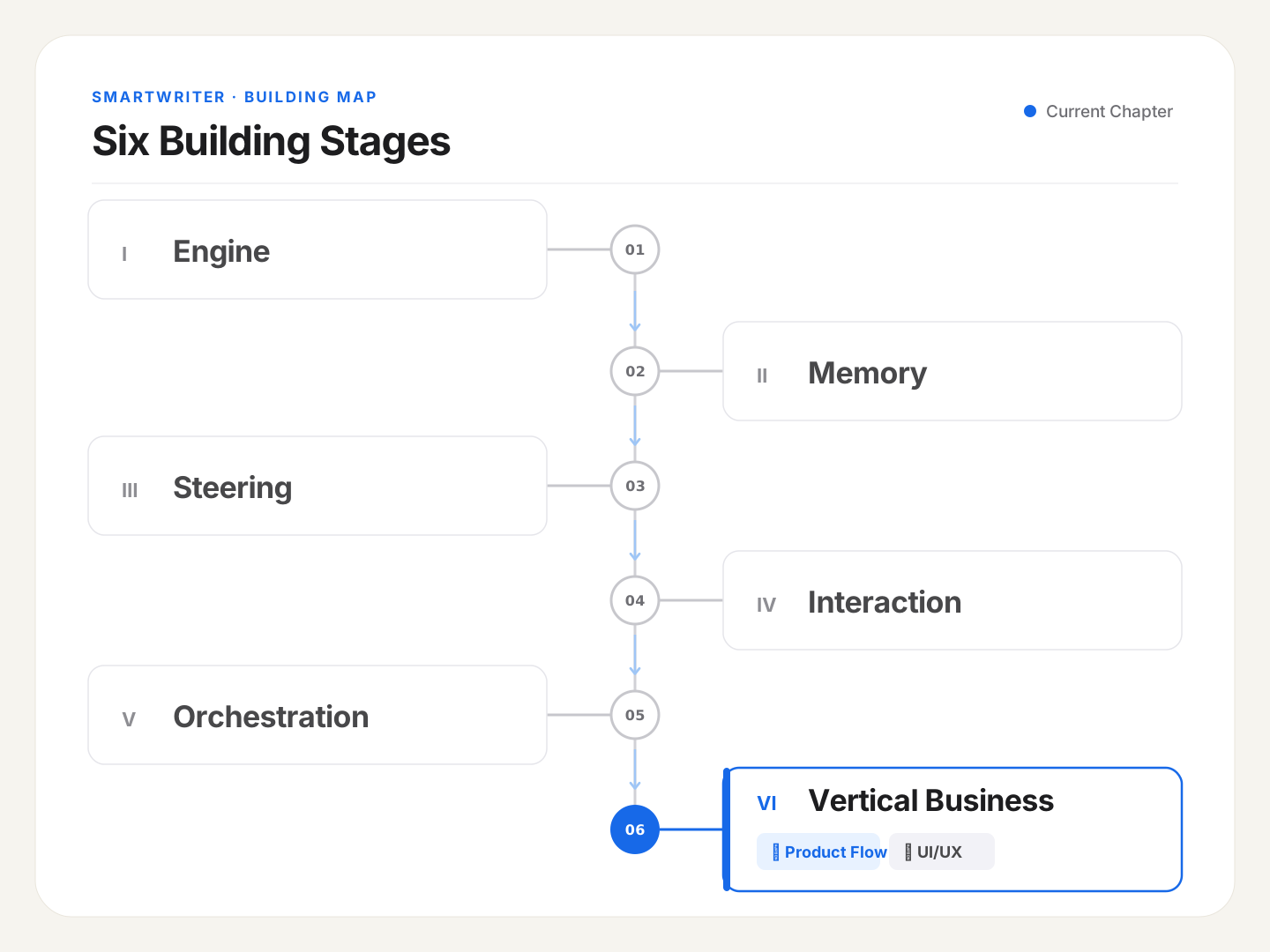
🪧 12 Parts — How Do You Assemble a Car a User Can Actually Drive?
The last twelve posts read like taking an engine apart, piece by piece, laying out all 12 of the agent's components one at a time to examine. But honestly, the user doesn't care about any of these parts, and they shouldn't have to.
Someone focused on writing has no reason to care whether the backend is running a Loop or a Hook, or whether it delegated to a Subagent. They care about exactly one thing: can this thing help me turn what's in my head into a real, finished piece — faster, and closer to what I actually meant. However precise the parts are, if they don't assemble into a car you can actually drive, they're worth nothing to that person.
So this last section is about "assembling the car." And the core move of this post can be thought of as bridge-building: one end is "standard, generic agent capability"; the other end is "the real requirements of this specific business — writing." My job is building the bridge between the two. This post covers the four most important bridges, one at a time.
🧭 The Foundation: Flow Design — One Task, Always Circling Back to "One Piece of Work"
Before building those four bridges, one foundation needs to be poured first: Flow Design. It came up briefly in post 7, on output contracts — here's the full picture.
Boiled down to one sentence: from start to finish, a writing task revolves around exactly one piece of work. The draft and attachments you drop in, the slash commands and instructions you type — all of it is input; all of it flows toward the same thing: making this one piece better, smoother.
That "only one piece of work" premise is the origin point of the whole product design — everything built on top of it, every flow and feature, is built around this. It gives the user a stable anchor: whether you just used a polish command, pasted in some material, or said something offhand, you always know exactly what it's acting on — "this one piece," and never some second or third piece silently appearing out of nowhere to confuse you. Incidentally, this piece is called draft.md on the backend, but that name never surfaces to the user — in conversation, it's always just "your piece" (internal terminology stays internal; the user only ever hears plain language).
With this foundation poured, the bridges can start.
🌉 Bridge One: Context Injection Order — Feeding a Pile of Inputs to the Model in an Order It Can Actually Use
The first bridge hides somewhere easy to overlook: order.
A standard agent conversation with the model can only ever pass across "one user message" at a time. But in a writing task, what a user's single interaction can contain is genuinely varied — genre methodology for this kind of piece, the collaboration mode being used this time, a carefully prepared writing draft, a quoted excerpt selected from the piece, uploaded reference attachments, and finally, the instruction the user actually typed. Six fundamentally different kinds of input, all needing to fit into that one user message — and the order they go in turns out to matter a great deal.
Here's the order I settled on, followed exactly on every single context assembly:
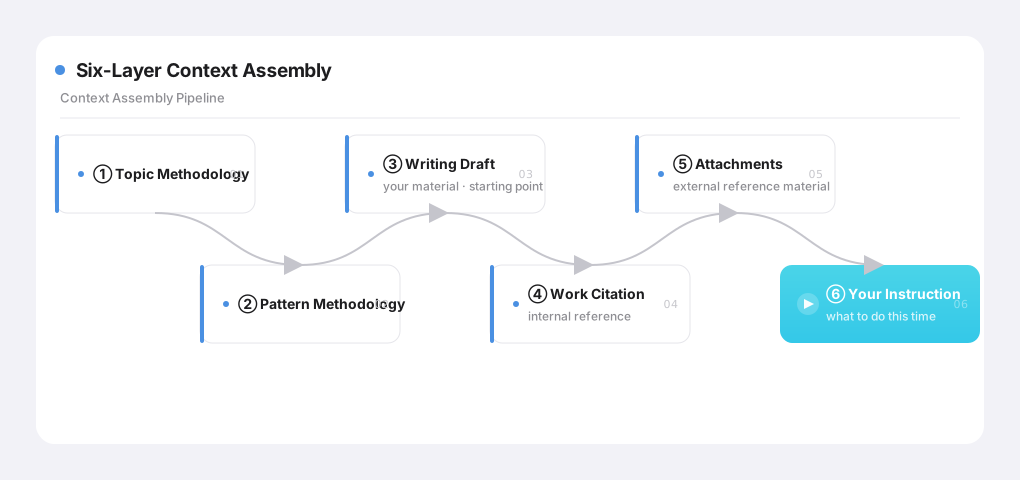
The reasoning behind this order comes down to a semantic priority I worked out myself: source material comes before internal references, internal references come before external references, external references come before instructions. Plainly: let the model absorb all the "raw material" first, and only then tell it "here's what to do with it this time." This matches how a person actually thinks — you normally read through everything you've got on hand first, and only then decide how to write it — not the other way around.
Here's an example. Say you've uploaded a hefty product doc and typed "help me write an introductory explainer piece for a general audience." Here, the product doc is "external reference" (an attachment), and "write... a piece" is "the instruction." Under this ordering, the doc comes first, the instruction comes last. Laid out this way, the model absorbs the product doc as material first, and only then receives the instruction to "write an explainer piece." Flip that order — instruction first, doc after — and the model might read through that long product doc and, by the end, have half-forgotten what the actual task was, drifting off course. Same pile of inputs — just a different order — and the outcome can be wildly different. This bridge is exactly "the order of the input."
🌟 Bridge Two (the important one): The Profile Loop — How "Gets Better the More You Write" Actually Turns
The second bridge is this product's soul, and the one most worth walking through in detail. Everything built so far makes the agent "able to write." This bridge is what carries it past the fence around one single writing session, into genuinely "getting better the more you write."
In my view, a user's "second edit" on an AI-produced draft is the single highest-quality style signal you can get. Once the AI finishes writing, whatever words you swap, whatever sentence you reorder or rephrase, whatever paragraph you cut — those edits reveal your actual preferences far more honestly than any survey ever could.
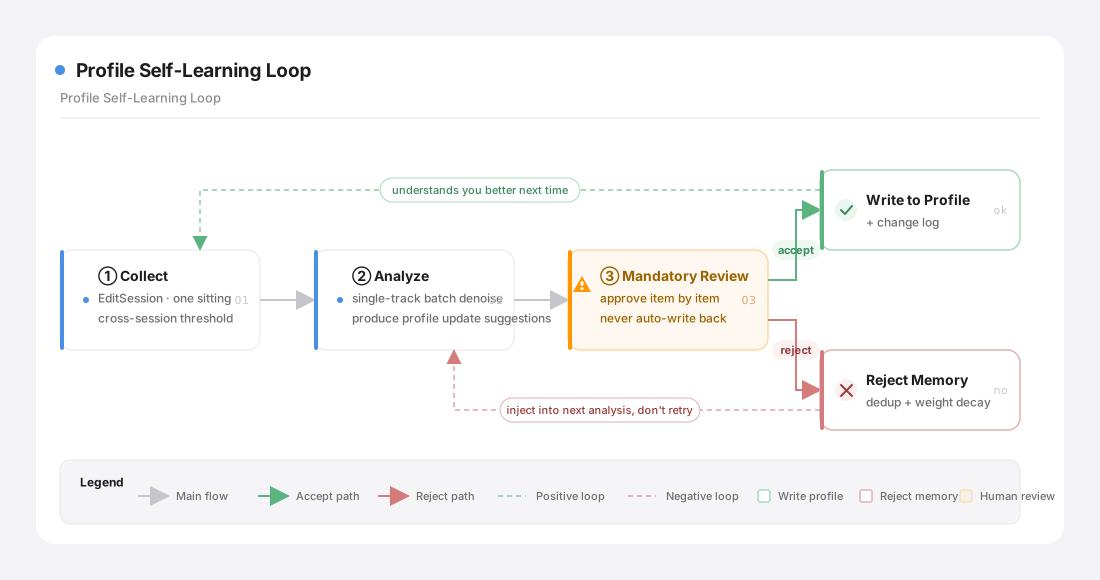
The whole implementation breaks into 4 steps.
1) Collection: EditSession — one "sit down and edit" counts as one round, like using Word
How do you define "one edit"? This was the first real problem. Originally, I counted it per save — and that turned out to be full of issues. Only after a rebuild did a better-fitting concept get introduced: EditSession.
Here's the analogy: you open a Word document, work on it for a while, and eventually close it. That whole stretch is one EditSession. It doesn't matter how many times you hit Ctrl+S in the middle — all of that is part of the same session; closing the document is what marks it as finished. In SmartWriter's terms: clicking "edit" to enter edit mode is the start; the autosaves happening along the way just quietly accumulate, without being settled individually; clicking "exit edit" (or switching to another task, or closing the page) is the end. One session eventually settles into exactly one edit record.
Once that concept was settled, three key design decisions followed from it:
- The diff baseline is fixed as "the AI version at the moment the session started." Even if the AI version gets updated somewhere else mid-edit, the baseline for this comparison doesn't move. Otherwise, if the baseline drifts, whatever "what did you change" gets computed becomes meaningless.
- The "is this change big enough" threshold applies to changes accumulated across sessions, not to a single session. This was a real flaw the rebuild fixed: the old version pinned the threshold to "a single save," so a user in the habit of making small edits, repeatedly, never crossed that threshold on any one save — and their preferences got permanently missed. Once it accumulates across sessions, a little today and a little tomorrow eventually adds up to a sample large enough to catch.
- The diff isn't computed the instant you exit edit mode — it's deferred to "a good moment." Autosave only accumulates; the actual comparison work happens on the backend later (at startup, on a periodic low-frequency scan, or when you actively click "update profile"). Saves compute, and doesn't interrupt your writing.
One more product constraint worth noting: editing and conversation are mutually exclusive. While you're in edit mode, the AI doesn't touch your draft; once you're not editing, the AI can. That guarantees you never get the mess of "you and the AI editing the same piece at the same time," and the diff baseline stays stable for the entire session.
🔧 Gotcha · before the rebuild, this collection pipeline had three real flaws baked in
This bridge went through more than one version. Looking back at the old, pre-rebuild version, there were three flaws — any one of them alone could quietly break "gets better the more you write":
- The threshold was pinned to "a single save": users who make small edits repeatedly never crossed it on any one save, and their preferences got permanently missed. (Fix: accumulate across sessions instead.)
- The AI's archiving step could "eat" the user's own edits: every time the AI finished a pass, it archived a version, and the old logic didn't protect that timing carefully — it could mistake the user's own not-yet-settled manual edits for something the AI itself had written, contaminating the signal outright. (Fix: protect the user's unsettled edits before archiving + make editing and conversation mutually exclusive.)
- Analysis only ever triggered on backend restart: even once enough had accumulated, it still had to wait for me to restart the backend to actually run — effectively useless. (Fix: tie the trigger to three moments instead — startup, periodic scan, and the user's own click.)
The devil, in "collecting a signal from user behavior," lives entirely in the edge cases — small repeated edits, concurrent changes, trigger timing. Miss any one of them, and what you've collected is just a pile of dirty data — feeding it into the profile only drags it further off course.
2) Analysis: single-track batch processing — you only see a "stable preference" once you've looked at several pieces at once
The edit signal that gets collected doesn't write back immediately — it accumulates until there's a full batch, then runs one analysis pass across all of it at once (I call this single-track batch processing).
Why not immediately — why batch it up? Because looking at one single article's edits, there's no way to tell "stable preference" apart from "one-off noise." You changed "very" to "particularly" this time — maybe that's a real preference, maybe it was just convenient for that one sentence. Typos, ad-hoc tweaks, purely factual corrections — all of that noise is mixed in there too. Only once you've looked across several pieces together do the patterns that keep recurring — you consistently swap out a certain kind of word, you consistently break long sentences into shorter ones — actually surface. Those are the stable signals worth writing into the profile.
This analysis is an entirely out-of-band process — it never happens inside the tool loop you and the AI are writing in; it runs silently in the background. And it doesn't fire automatically just because a batch is full: analysis only actually fires when you explicitly click "update profile." Startup and the periodic scan only accumulate diffs and update the progress indicator — they never run the analysis itself. The intent behind this: profile updates are a "spend tokens, produce suggestions" action, and the user should control the timing — it shouldn't quietly happen in the background without asking. What it produces is "a structured conclusion consumable by code," which ultimately becomes one deterministic interaction on the frontend: all you have to do is accept or reject.
3) Human review: the profile never writes itself — every item gets your nod first
Whatever the analysis produces is always just a "suggestion" — it's never written into your profile automatically by code. It has to go through your own review, item by item, with you clicking "accept" or "reject" on each one.
Why this cautious? Because the profile is the soul of your writing, and the cost of contaminating it is too high. A profile poisoned by dirty data makes the AI write "less like you," article by article — and that's the entire foundation this product stands on, gone. Better to ask one extra question per batch than to bet on the accuracy of an automatic write-back. This "human review" step is the safety pin added onto the profile — the core asset this whole thing protects.
4) Reject memory: everything you've said no to, I remember — so it never bothers you with something similar again
The two actions you can take during review get treated very differently:
- Click "accept": written into the profile, with a changelog entry.
- Click "reject": goes into a dedicated reject memory (deduplicated by content, with weighted decay over time).
The key is how "rejection" gets treated. A "reject" signal is actually stronger than an "accept," because it's you explicitly saying "I don't want this." So it gets recorded with real weight — the next time analysis runs in the background, everything you've explicitly rejected gets fed back in, so it avoids producing similar suggestions again. One level deeper: rejected edit patterns also get distilled into structural constraints. It's not just a reminder in the prompt anymore — it can also filter output after the fact as a hard rule, blocking similar suggestions at the source. And when you reject something, you can annotate why ("this isn't a voice preference, it's a content correction," "I disagree with this edit") — those reasons get grouped and fed back into the next analysis, so the model learns from your rejection patterns instead of just rephrasing the same suggestion and trying again.
This is where the product's "understanding you" gets a lot more three-dimensional: it doesn't just remember what you like — it remembers what you've explicitly rejected. Isn't that exactly what a thoughtful collaborator who actually gets you would do? They don't bring back a proposal you already shot down last time, dressed up in different words.
Put all four steps together, and that's the full picture of "gets better the more you write":
🌉 Bridge Three: Task Lifecycle — A Two-Layer Design for Archiving and Deleting
The third bridge is unglamorous, but a product is genuinely awkward to use long-term without it: tasks pile up, and users need a way to tidy them up.
So I built two layers:
- Archive (soft delete): tasks you're not currently looking at get tucked away, hidden from the default list, but the underlying conversation record and working directory stay intact, fully restorable at any time.
- Delete (hard clear): something you're sure you don't want, purged completely — conversation and directory both gone, irreversible, with a confirmation prompt before it happens.
Offering only "delete," and users get too afraid of misclicking to ever actually clean up, so tasks just keep piling up. Offering only "archive," and neither disk space nor mental clutter ever really gets released. Layered together, they cover the most natural cleanup path there is: "archive it to tuck it away and observe → delete it once you're sure it's truly not needed."
Worth a somewhat pedantic engineering note here: task state in memory is the runtime source of truth, and the record on disk is a snapshot rebuilt on restart — I have to hold onto one invariant: "if it exists in memory, it must exist on disk." So the delete order is locked down tight: clear disk first, then remove from memory — never the reverse (a crash in the middle would otherwise leave an orphan — gone from disk, still in memory). There's also a self-healing mechanism at startup: a scan that automatically archives any task whose conversation record has become corrupted. None of this is ever visible to the user, but it's exactly what keeps the product from producing the weird, inexplicable bugs that erode trust.
📊 Bridge Four: Success Metrics — How Do You Actually Prove It's Useful?
The last bridge points at the place a product is easiest to fool itself about, and most needs a cold, honest look: what actually justifies calling this product useful? I settled on three observable metrics:
- S1 · The full loop runs end to end (capability check): profile injection → multi-turn interruptibility → command activation → plan mode → final review → hook-driven profile write-back — every mechanism demonstrable, start to finish. This is the baseline for "the capabilities are actually there."
- S2 · Share of characters from second edits (efficiency check): how much of the AI's finished draft you ended up changing, as a share of the total. The lower this ratio, the closer the AI's first pass already matched what you wanted, and the more real the productivity gain. This is my measure of "is it actually saving time."
- S3 · Self-rated quality of profile suggestions (understanding-you check): after you process a batch of profile suggestions, you rate — on a 1-to-5 scale — whether that batch actually landed on your real preferences, and I track how that score trends across batches. A rising trend is the proof that "gets better the more you write" isn't just a slogan.
S2 and S3's data doesn't need any separate instrumentation at all — it's already baked into the profile loop. S2's "how much did you change" is exactly what falls out of the diff computation in bridge two's "collection" step. S3's "did the suggestion land" is exactly what naturally comes out of you clicking accept/reject during "human review." One loop does double duty — it's what makes the product "get better the more you write," and it's also, incidentally, where the measurements proving that it actually works come from.
⚖️ Where This Gets Vertical: Refusing to Be a Copycat of "Just Another Generic Agent"
Here, connecting all four bridges together for the full picture:
⚖️ The tradeoff · where generic and vertical agents actually diverge
Standard agent capability The "lazy" way to use it What SmartWriter does One user message Dump the user's input in as-is Orders 6 categories of input by semantic priority Memory Records some facts, some chat context The profile loop: collect edits → denoise → human review → reject memory Session / task Use it and walk away Two-layer lifecycle: archive + delete Metrics from tools None S2/S3 success metrics fall out naturally
A generic chat assistant is a conversational box that can talk about anything, but is embedded in no real business at all. Everything a vertical agent does comes down to taking every standard capability and welding it, solidly, onto one specific business need. Nothing in this post — Flow Design, injection order, the profile loop, lifecycle, success metrics — comes free out of the SDK. Every one of them had to be bridged by hand, standing between "standard capability" on one side and "real business need" on the other. How many bridges you build, and how carefully — that's the entire difference between this and "just another generic agent."
That's the whole product-flow thread. This entire post has been about "how the backend actually runs." But what a user actually touches with their own hands was never any of this machinery — it's a page, an input box, a draft. However elegant the agent's internal reasoning is behind the scenes, how does it get translated into an interface that even someone with zero technical background can look at and immediately understand, and use comfortably?
That's the last post in this whole series — the "last mile": a collection of small UI/UX ideas. Let's keep going.