01. Loop
The Agent's Heartbeat: What Really Happens Inside "One Conversation"
The prologue planted a flag: an agent product = a model (the engine) + a whole harness around it (the control plane). Starting with this post, we're going to take that harness apart, layer by layer. First stop: the lowest-level mechanism that lets an agent actually do things on its own — you can think of it as the agent's heartbeat. There's also a small question left hanging from the prologue: when you ask it one thing, how many round-trips does it actually run internally? And why can't that number be shown to the user as "turn N of the conversation"? Let's dig in.
🪧 A Misread Number Broke the UI
When I first started building SmartWriter's frontend, I wanted a little "Turn N" indicator in the corner of the chat panel — the kind of thing a lot of chat products show, so users get a feel for how long they've been at it.
Seemed simple enough. The SDK returns a field called num_turns at the end of every task — sounds exactly like "number of turns," right? Open and shut case. Except it wasn't.
Ask the model to "polish the third paragraph," and before we've even exchanged a second message, that number jumps to 3. Send one more instruction, and it leaps to 7. The user has said all of two sentences, and the UI is telling them they're on "turn 7." Anyone reading that is going to be confused.
I had the concept of a turn wrong from the start. This post starts from that small misunderstanding and works backward to answer a bigger question — how does an agent get to act on its own in the first place?
🧭 The Core Idea: A turn Isn't a Conversation Round — It's One Heartbeat
A turn here isn't what the user thinks of as "one round of conversation." It's one internal tool round-trip inside the agent.
To explain this properly, we have to go back to the question the prologue left open: same Claude model underneath, so why can Claude Code read your code, edit files, and run tests all the way through on its own, while a program that calls the raw API just does "you say something, it says something back"? The difference is the engine underneath — what the industry calls the Agent Loop (think of it as the agent's heartbeat: a loop that keeps turning on its own).
Here's how it turns: the model produces some output, and that output may or may not include a tool call (e.g., "I need to read this file"). If it does, the system intercepts it, runs the tool on the model's behalf, and feeds the result back into context. The model picks up from there, and might call another tool. Round and round it goes, until the model produces plain text with no tool call attached — only then does the loop stop and hand control back to your code.
Pseudocode makes this concrete:
# The Agent Loop, stripped to its skeleton (pseudocode)
while True:
    out = model.generate(context)      # ① model produces output (may include tool calls)
    if not out.tool_calls:             # ② no tool calls left?
        return out.text                #    done — hand control back to you
    for call in out.tool_calls:        # ③ there are tool calls
        result = run(call)             #    execute on the model's behalf
        context.append(result)         #    feed the result back into context
    # loop continues, into the next turn
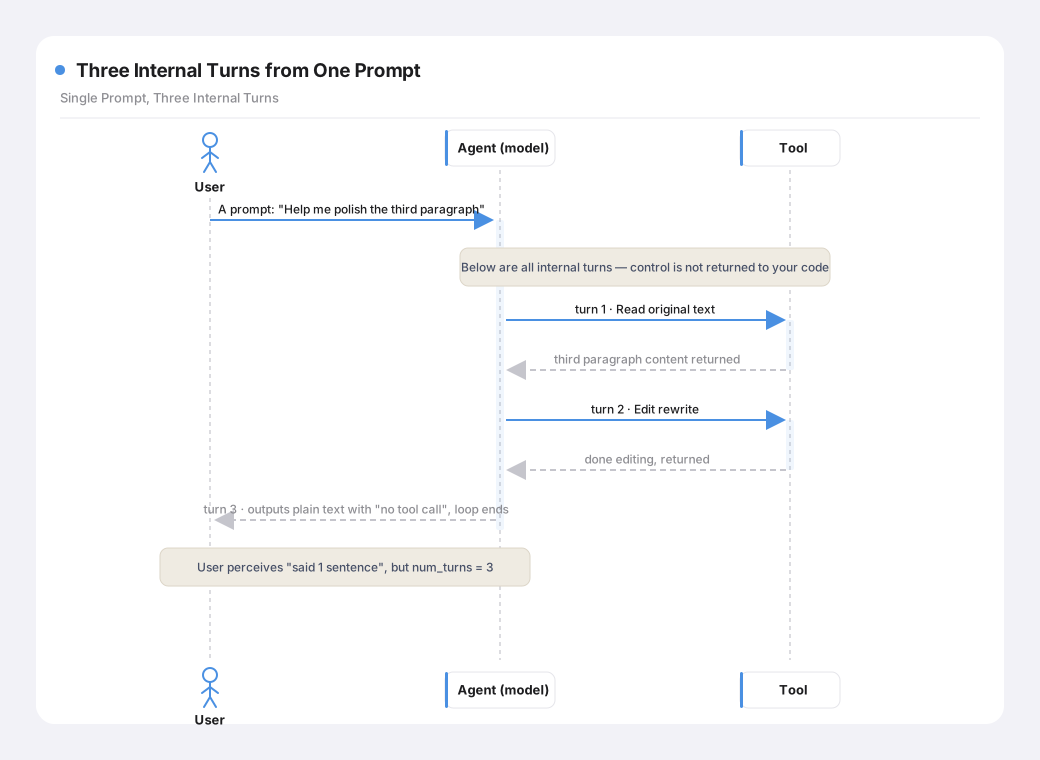
With that in hand, the number that looked like it was jumping around earlier makes perfect sense: one lap of this loop is one turn. That first instruction — "polish the third paragraph" — actually drove several laps internally: a Read to pull the original text (one turn), an Edit to rewrite it (another turn), and finally a plain-text "done" to close it out. The user said one sentence; the model's heart beat three times. num_turns counts those heartbeats — not how many things you said to it.
One prompt (your single question) can drive several turns (the agent's tool round-trips) under the hood. A turn is not a conversation round.
I think this is the first real hurdle to understanding agents, and it's the core thing separating them from chatbots. A chatbot is strictly call-and-response — you ask, it answers, no more and no less. An agent, by contrast, works by delegation: you hand it a goal, and it figures out on its own how many steps that takes. Deciding its own lap count is what "acting on its own" actually means, mechanically.
Here's what that heartbeat looks like for the "polish the third paragraph" example, laid out as a diagram:
🔩 How Claude Code Does It: This Heart Never Stops Beating
This loop isn't some abstract concept I made up — it's literally how Claude Code runs under the hood.
The Claude Code Harness Book devotes a whole chapter to exactly this, titled "Query Loop: The Heartbeat." It frames this loop as the heart of the entire agent. Tell Claude Code to "finish the tests for this module," and it reads files, writes code, runs the tests, reads the failures, and fixes them — all without you stepping in — because that heart keeps beating, one turn after another, until the work is actually done (until it produces output that no longer needs a tool). The first post in the Learn Claude Code source-walkthrough series covers the same loop from an implementation angle, breaking down each beat of the query loop — worth a read if you want to go deeper.
Lining it up against a raw API call makes the difference obvious:
- Calling the raw Messages API: you send a message, the model sends one back,
done. Want it to "read a file, then answer"? You write the code that reads the file and stitches it into the next request yourself — the model has no way to reach into your world. - Claude Code's query loop: the model says "I need to read this file," and the loop reads it for the model and feeds the content back in, and the model keeps going from there. The model now has the ability to reach out into the external world and keep working off what it finds.
If you've spent any time in Claude Code, you've seen this heartbeat. Every turn, the terminal refreshes with "reading file," "editing code," "running tests" — you can watch it work, step by step, correcting itself as it goes. Because the whole process is laid bare in front of you, developers using Claude Code build the intuition fast: say one thing, watch a dozen things happen internally. It stops feeling strange almost immediately.
The prologue's line — "what's missing isn't the model, it's the layer around the model" — starts right here, at the very bottom. This heartbeat is what turns a model from a question-answering machine into something that can drive a multi-step task on its own. And it's the foundation everything else in this series sits on top of: memory, tools, permissions — all of it is built on top of this loop.
🛠 What the SDK Gives You: A Concept Map + Five Control Knobs
The Claude Agent SDK packages up what the Claude Code CLI does into a programmable backend interface. At the Loop level, it hands you two things: a mapping of concepts, and a set of knobs that control how the loop runs.
The concepts, first
The SDK's vocabulary and the vocabulary of a writing task need to line up before anything else makes sense:
| Concept in a writing task | Concept in the SDK | In one line |
|---|---|---|
| One writing task | A session (one conversation history, persisted as JSONL) | From opening a new task to a finished draft — every interaction in between shares the same context |
| One user question / instruction | A prompt (drives some number of turns) | "Polish the third paragraph" might internally run Read → Edit → output, spanning several turns |
| One agent tool round-trip | A turn | Bounded by max_turns; it counts tool round-trips, not conversation rounds |
| Each incremental chunk of streamed output | A StreamEvent | The chunks behind the typewriter effect |
| Each of Claude's replies | An AssistantMessage | Contains text blocks and tool-call blocks |
| The result of each tool execution | A UserMessage (tool result) | The result fed back into the model |
| The signal that a task is finished | A ResultMessage | Carries the final text, token count, cost, session ID, and num_turns |
This table looks like trivia, but it's the glossary for this whole series. The first three rows especially — one writing task = one session, one thing the user says = one prompt, a turn is an internal tool round-trip — come back again and again in later posts.
📐 Going deeper · session, prompt, and turn nest inside each other
session (one writing task, one conversation history)
└─ prompt A (you say: give me an outline)
│    └─ turn 1 (read the draft) → turn 2 (produce the outline, stop)
└─ prompt B (you say: expand point two)
│    └─ turn 1 (read) → turn 2 (edit) → turn 3 (produce output, stop)
└─ prompt C ...
Within one session, you'll send several prompts; within each prompt, the loop might run several turns. The deeper you go, the more it's "the model's own business," and the less it belongs in front of the user: a session is something the user is aware of (one writing task), a prompt is something the user is aware of (each thing they say), but a turn lives at the innermost layer — the model working things out on its own — and the user, for the most part, doesn't need to care.
Now, the controls
You can't let this heart beat forever unchecked. The SDK exposes five knobs that govern how the loop runs, for how long, and at what cost:
| Parameter | Controls | In one line |
|---|---|---|
| Model | Which model to use | The master switch for quality, speed, and cost |
| Max budget | Spending cap for a single task | Stops the moment it's hit — guards against a long task quietly burning money |
| Effort | How hard the model reasons | low / medium / high / xhigh / max — the harder it works, the slower and pricier (and deeper) the output |
| Permission mode | Whether tool calls need approval | Whether the agent has to check with you before it acts (more on this in the permissions post) |
| Max turns | A hard cap on heartbeats | A pure safety fuse — stops it from spinning forever if something goes wrong |
📐 Going deeper · what actually makes the loop stop, and what happens when it doesn't
Earlier I said the loop "runs until it produces plain text, then stops." Let's be precise about that stopping condition. The SDK decides whether a prompt is finished by checking exactly one thing: whether the model's latest output still contains a tool call. If it does, the loop executes it, feeds the result back, and keeps going; if it doesn't (it's plain text), the loop stops immediately and hands control back to your code. Notice what it does not check: whether the task is genuinely finished. It only checks whether the model still wants to use a tool. Those two things usually line up — but not always.
That gap is exactly where things can go wrong: what if the model keeps wanting to use tools and never produces plain text? This does happen in practice — a tool keeps failing and the model stubbornly keeps retrying, or it oscillates between two different fixes and never converges. In that case, the "stop when there's no tool call" condition never fires, and the loop can, in principle, run forever, burning tokens the whole time.
That's exactly what
max_turnsis for — it's a fuse. The other knobs tune quality;effort, for instance, controls how hard the model reasons.max_turnsdoes one job only: once the heartbeat count hits the ceiling, it force-stops the loop and hands control back, whether or not the work is actually finished. Normal tasks rarely get anywhere near it (a single polish pass is usually three to five turns) — it only shows up when something's gone off the rails, so it's purely a safety mechanism, unrelated to output quality.In SmartWriter, I tuned this fuse's sensitivity per scenario: a normal writing prompt gets a ceiling of 30 (comfortably enough for any legitimate task, while still catching runaway loops); the plan phase (which only explores and drafts an outline, without touching files) gets a much tighter ceiling, around 10. The plan phase shouldn't involve many tool round-trips to begin with, so tightening the ceiling makes the drifting-off-track alarm far more sensitive — if it's still churning after a dozen-plus turns without an outline to show for it, it's almost certainly stuck in a rut, and cutting it off early is cheaper than cutting it off late.
The stopping condition governs the normal exit;
max_turnsgoverns the abnormal one. The first is the loop's everyday off-ramp; the second is the last line of defense against it burning through your wallet.
The SDK exposes all five of these knobs as tunable. But "tunable" doesn't mean "hand all of them to the user." Deciding which ones to expose and which ones the system should silently own is exactly the kind of product tradeoff that makes this work interesting.
🧩 What SmartWriter Customizes
Keeping unnecessary cognitive load out of the writer's way
Writing an article is a bit different from writing code. When we're actually writing, we don't usually care how many times the model called Read or Edit — what we want to see is how the model is reasoning through the piece and improving it, one pass at a time. The tool round-trips in between are mostly noise. So on the frontend, streamed output gets special handling: thinking blocks are deliberately surfaced, and tool-call chatter is deliberately toned down.
I also split the SDK's five knobs into three tiers, based on whether the user should even have to think about them (see the table below). The goal is to keep the user's attention on the writing itself, and let the system absorb the rest as a sane default with guardrails. What's left for the user to decide comes down to one simple call: use a stronger model for complex writing tasks, a lighter one for everyday writing.
| Parameter | Owned by | Why |
|---|---|---|
| Model | 🙋 The user | It directly drives quality and cost, so the user should have the say. SmartWriter's main writing flow defaults to Claude Sonnet 5 / DeepSeek-V4-Flash; users can change the default in settings, or override it per task |
| Effort | ⚙️ The system, silently | I originally wanted to tie this to command type (low for polishing, high for rewrites), but it turns out this parameter is locked to the session — you can't switch tiers mid-task on a per-message basis. Forcing a tier split would risk hurting later steps, so I let the model judge for itself instead of dragging the user into this level of detail |
| Permission Mode | ⚙️ The system, silently | The user only needs to sense whether the agent is planning or executing, and whether it's about to go online — not internal mode names like acceptEdits |
| Max budget | 🔧 A pure background fuse | The hard circuit-breaker for the complete Agent Loop triggered by a single user instruction — it accumulates every model call within that round, including input context, output, thinking, and any follow-up calls after tool round-trips. It's mainly there to cap Claude's Adaptive Thinking cost; it's disabled for DeepSeek, since the Claude CLI doesn't recognize DeepSeek's native models and would price them as an expensive Claude model by mistake, wrongly flagging perfectly normal DeepSeek tasks as over budget |
| Max turns | 🔧 A pure background fuse | A ceiling against runaway loops (30 for a normal task, tighter during planning) — the user never needs to know it exists |
The actual fix for that jumpy number: count it yourself on the frontend, don't use num_turns
Back to the question this post opened with. Once you understand what a turn actually is, the fix is obvious.
num_turns counts the agent's internal tool round-trips — it's a heartbeat count. What users actually care about is which round they're on — a count of how many times they've spoken, a conversation count. On the input area, I split these into two separate displays based on state: while the model is working, you see turns updating in real time; once that round of work finishes, the UI shows the conversation's actual round number.
⚖️ Closing Thoughts: An Internal Counter, and a Vertical Product's Tradeoffs
⚖️ The tradeoff · five loop-control parameters — expose them, or hide them?
The "lazy" default What SmartWriter does Why Exposing parameters Surface as many as possible — proves it's "configurable, powerful" Only expose Model; the system owns the rest Lowers cognitive load; fine-grained knobs like effort tiers belong to the system, not the user Turn counting Show num_turnsdirectly — it's right there, easyThe frontend counts "which round" itself, based on prompts A heartbeat count isn't a conversation count — conflating them doesn't make sense Design stance Addition: give users every knob you can Subtraction: ask "does the user actually need to see this?" first A vertical product earns its usability by cutting, not by adding
There's something a little humbling about writing this out. System prompts, permissions, subagents — these mechanisms sound impressive on paper, but day to day, building a product mostly comes down to small decisions like this one: should this internal number, this one tunable parameter, be shown to the user at all? None of these decisions look like much on their own. But it's the accumulation of a hundred small tradeoffs like this that decides whether what you end up building is "yet another generic chat box," or "a copilot that actually understands the domain it's working in." The devil really is in the details — and the only way to develop an instinct for them is to get in there and build.
So: that's the Loop, at least in outline. It spins, lap after lap, until the work is done. But there's a catch already baked in: spinning costs context. Every lap — every file it reads, every tool result, every back-and-forth — gets stuffed into a context window that has a hard limit. Run it long enough, and that window eventually fills up. And when it does, the system automatically does something called "compaction": it summarizes the earlier content down to make room. Sounds considerate enough — except that for writing, summarization can quietly erase the exact thesis you nailed down three paragraphs ago.
This engine's tendency to "forget" the longer it runs — and how to rescue the things a piece of writing can't afford to lose — is next. Let's keep going.