02. Compact
Context Amnesia: Compaction Is a Budget War
The last post took apart the Agent Loop — that self-driving loop spinning lap after lap — and left one loose thread: spinning costs context. Every file it reads, every back-and-forth, every tool result gets stuffed into a window with a hard limit. Run it long enough, and that window fills up eventually, and the system auto-compacts. Sounds considerate enough — but for writing, how do you make sure your original thesis survives the compression?
🪧 A "Free" Perk Worth Reading the Fine Print On
The Agent SDK ships native automatic context compaction. On paper, that's a good thing.
Think about it: the context window has a hard ceiling — treat it as the model's "working memory," and once it's full, nothing else fits. Any long article eventually accumulates enough back-and-forth, enough drafts read, enough revisions, to fill that memory up. The SDK's pitch is: I've got this handled — when it fills, I compact, you don't have to think about it. My first reaction was, honestly, relief — one less thing to worry about.
But it's worth spending a few minutes understanding what "compaction" actually does, because black boxes tend to hide gotchas.
Stripped down, its method is blunt: replace the earliest messages with a summary, to make room for new ones. There's actually a fair amount of careful layering behind that "summary" in the Claude CLI's harness — the next section digs into it. The problem is that this whole mechanism was built for coding, and while it does work when carried over to writing, it can easily lose the things that are never stated outright, but have to hold true the whole time: your personal style preferences, the things you've explicitly said not to do, the outline and progress of the piece you're writing. Compress any of that down into a flat one-liner like "discussed the direction of the article," and it's effectively gone.
So "automatic compaction" is a double-edged sword for a writing product: yes, it solves the hard failure of "context overflow" — but it can also, aggressively, strip out the exact things you least want to lose. This post is about how to keep the perk without letting it quietly damage the constraints that actually matter.
🧭 The Core Idea: Compaction Isn't "Getting Dumber" — It's Trading Detail for Budget
Before customizing anything, it's worth getting this concept straight, because it's easy to misread as "making the model dumber."
It isn't. Compaction (the industry calls it Compact) is a pure budget move — "budget" here meaning the finite capacity of the context window. As a conversation keeps growing and starts pressing against the ceiling, the system has to make room, or new content simply won't fit. The way it makes room: pull out the earliest batch of messages, have the model write a summary of them, and swap that short summary in for the original wall of text.
So at its core it's a trade: spend detail precision, buy window space. That space is a real win — long tasks literally can't continue without it — but the cost is that whatever got summarized, the model can now only see the summary, not the original.
"Compaction = trade detail for space" gets the essence right, but a few things are still worth pulling apart:
- How exactly does this trade happen? Is it one indiscriminate sweep, or is there a strategy to it? (This is where Claude Code's layered mechanism comes in.)
- How do you even know it happened? (Does the SDK signal it?)
- How do you protect the business-critical details that can't afford to be lost? (This is the part SmartWriter has to build.)
Let's take these apart one at a time.
🔩 How Claude Code Does It: Not One Sweep, But Four Escalating Layers
Compaction isn't as crude as "window's full, sweep out most of the oldest messages." The eighth post in the Learn Claude Code source-walkthrough series breaks this down in detail: Claude Code's (CC, from here on) underlying context management is genuinely careful — a four-layer escalation, firing in the order L3 → L1 → L2 → L4 (see the table below).
The logic is smart: avoid summarizing for as long as possible — reach for "lossless" tricks first, and only reach for "lossy" summarization when there's truly no other option. Think of it like cleaning out an overstuffed drawer: move the bulky items to storage first (you can always get them back), tidy up the loose odds and ends next, and only when it's still too full do you reluctantly compress some of it into a list and throw the originals away. Here's how the four layers divide the labor:
| Layer | What it does | Lossy? | In one line |
|---|---|---|---|
| L3 tool_result_budget | Moves large tool results to disk, leaves only a reference in context | Lossless (reads it back on demand) | Move the bulky item to storage — retrievable any time |
| L1 snip_compact | Trims "irrelevant" old exchanges | Low-loss | Deletes obviously-dead old threads |
| L2 micro_compact | Replaces old tool results with placeholders | Lossless (the summary sticks around) | Sort the odds and ends, label them |
| L4 autocompact | Has the model write a full summary of the entire history | Lossy (an LLM rewrite) | Reluctantly compress to a list, throw out the originals |
Only the last layer, L4, is genuinely lossy. The first three either move things elsewhere (still retrievable) or just clean up what's obviously dead weight. The one that actually summarizes away core content, making the original disappear for good, is L4 — and only L4.
🛠 What the SDK Gives You: An Automatic Transmission, and Exactly One Signal
The good news: this whole carefully-designed four-layer system — we don't write a single line of it ourselves.
SmartWriter runs by calling the Claude Code CLI through the Claude Agent SDK under the hood, and that complete context-management system lives inside the CLI itself. The SDK gives us three things, out of the box:
- Auto compaction is a fully automatic transmission. When the context is close to full, compaction just happens — the app doesn't need to monitor window usage or trigger anything manually. As hands-off as it gets.
- But there's exactly one signal exposed to the outside. Of the four layers above, L1, L2, and L3 all run silently — they finish and say nothing. The only thing the SDK exposes is a message sent after L4 completes, called
compact_boundary. In other words, the only compaction the app can actually perceive is the last, lossy one. That design actually makes sense: the three lossless layers don't need our involvement anyway — the SDK just handles them quietly — and it's only L4, the one that genuinely throws content away, that speaks up and says "heads up, I just summarized." - There's also a door for manual triggering and archiving. If you want to proactively tidy up context, there's no special API needed — just send
/compactas a plain message, and it recognizes the built-in command. There's also aPreCompacthook you can use to step in right before compaction actually runs — for example, archiving the current draft to disk first. For writing, keeping a full evolution history of the draft is genuinely valuable on its own.
So the SDK boils the whole problem down to: it manages the process, and the app side just needs to watch one signal — compact_boundary. And that's exactly the signal SmartWriter's compaction customization is built around.
🧩 What SmartWriter Does: Step In Only at the Moment of Loss
With compact_boundary as the one available signal, the whole compensation strategy comes down to: do nothing most of the time, and only at the moment L4's lossy compaction actually happens, put the core writing constraints that got summarized away back in. That splits into two moves:
One: Re-inject immediately after compaction
Some background first. For every genre SmartWriter writes (essay, product-tech writeup, book review — I call this a "genre"), a methodology for "how to write this kind of piece well" gets silently prepended to the very first thing you say — before your first word, even (this is called prepending). That way the model has genre-specific craft baked in from the first character it writes. Where that methodology comes from, and why it's injected this way, is the subject of post 6 (Skills) — the spoiler for now is just this: it's a block of content stuck in front of "your first message."
Which is where the problem shows up. L4 compaction summarizes the entire early history — including your first message — down into a summary. That genre-methodology block sitting in front of your first message naturally gets swept in too, and its detail gets lost.
The fix is direct: watch that one signal, and patch it back in right away.
# Compensate for L4 only: watch compact_boundary, re-inject on the next prompt
def on_message(msg):
    if is_compact_boundary(msg):          # the one and only "lossy compaction" signal
        handle.needs_genre_reinject = True  # flag it: needs a patch

def send_prompt(text):
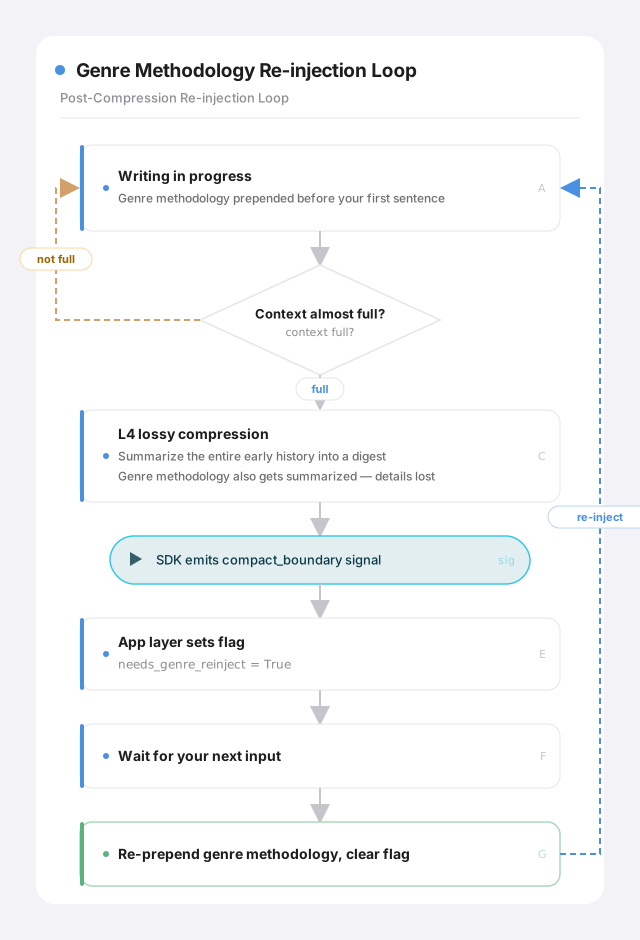
    if handle.client is None or handle.needs_genre_reinject:
        text = GENRE_METHODOLOGY_BLOCK + text   # prepend the genre methodology back in
        handle.needs_genre_reinject = False     # patched — clear the flag
    ...
Three steps: hear compact_boundary → flag it as "needs compensation" → the next time the user says anything, prepend the genre methodology back in, then clear the flag. As a diagram:
Two: for constraints that truly need to persist, let the CLI auto-renew them for free
Compensating after the fact is damage control. Can we just stop the damage from happening in the first place? For constraints that have to hold true the entire time — your writing profile, the core rules for this series — there's a cleaner answer: give them a mechanism that comes back at full strength the instant they're summarized away, without watching any signal or patching anything manually.
This brings in a character who'll star in several of the posts that follow: CLAUDE.md (think of it, for now, as a project-level "standing instructions" file). Its content gets stitched into the conversation history the same way the genre methodology does — it doesn't live in that immune zone called the system prompt — so L4 compaction sweeps it up along with the rest of the history, exactly like the genre methodology. But it has one property: the CLI re-injects it fresh before every single message you send, not just once, in front of the first one. Which means: even if L4 just tore the history to shreds a second ago, CLAUDE.md included, the moment you say anything next, a brand-new copy of CLAUDE.md comes back attached to that new message automatically. No signal to watch, no manual patch needed. It survives compaction not because it's immune to being summarized, but because a fresh one shows up the instant the old one's gone.
The two approaches split the work cleanly: content that's stuck on once and left alone (like the genre methodology, prepended only to the first message) needs you to manually watch compact_boundary and patch it back in. Content that gets automatically re-inserted with every single message (your profile, the series' core rules — routed through CLAUDE.md) doesn't need any watching at all; it just keeps itself alive. You can even write a plain-language "what to preserve on summarization" instruction inside CLAUDE.md — basically handing the meeting secretary a sticky note: when you compact, make sure to keep these specific things — this piece's writing goal, the outline that's been settled on, style preferences and hard no's the user has stated explicitly, key facts and citations, options already accepted or rejected, and so on. It's just an instruction written for the model, no special syntax — it works because of how seriously the model treats CLAUDE.md as a standing instruction file. Don't expect the compactor to remember something you just casually dropped into the conversation — it's only accountable for content with a formal identity: standing files and hooks.
📌 A point that's easy to assume wrong: I used to believe
CLAUDE.mdresisted compaction because it lived in some special spot inside the model's "system prompt." That's wrong. It's actually stitched into "your first message" — and every message after it — wrapped in a special tag, and has nothing to do with the system prompt at all. What actually makes it survive compaction is that one rule above: re-inserted fresh on every new message, regardless of whether compaction happens. Get this cause wrong, and every downstream judgment call about "what goes where" falls apart — worth flagging explicitly. As for why Claude Code's own team chose to put it here instead of in the system prompt, there's a caching-efficiency design consideration behind that too — more on that in post 5, on System Prompt.
⚖️ Compaction Isn't a Small Thing — A Writing Agent Has to Protect Its Thesis
All of the above boils down to one thing: automatic compaction is genuinely useful, but you can't just hand it the wheel — anything business-critical still has to be protected on purpose.
⚖️ The tradeoff
The "lazy" default What SmartWriter does Why Attitude toward compaction Mostly hands-off, take the default auto-compaction, whatever gets summarized gets summarized Watch compact_boundaryclosely, compensate immediately after L4For writing, losing the thesis you locked in three paragraphs ago is a fatal experience Where standing constraints live Written into the first prompt, for convenience Moved entirely into CLAUDE.md, re-injected on every requestContent in the conversation gets compacted away; only CLAUDE.mdstays immune the whole timeCompensation scope Either nothing, or a full replay (burns tokens) Only compensate for L4, only for the handful of things that truly need to persist Precise, targeted — don't sacrifice cost for convenience, and don't sacrifice the core for cost
At the end of the day, this is the fundamental difference between a writing product and an ordinary chat product: a chat tool can forget what you said this morning, and worst case you repeat yourself — the cost is close to zero. But if a writing assistant loses the soul of the piece, no matter how smooth the resulting prose reads, it's not the article you wanted anymore.
One more thing worth being precise about: not everything that passes through deserves to be protected — "standing constraints" and "starting material" are two different categories. Thesis, tone, hard no's, genre methodology — these are "standing constraints." They're required to be present the whole time, and losing them to compaction is fatal, so they get protected. The draft and reference material you dropped in at the start are a different animal — they're "starting material," the raw ingredients and starting point for this piece. Once the model has absorbed them and folded them into the work taking shape, their job is basically done — they don't need to permanently occupy context. So it's fine if compaction sweeps them away — that's a deliberate choice not to protect them.
You can draw a parallel to how the CC harness treats old tool calls: after compaction, an earlier tool call usually leaves nothing behind in context but a lightweight trace that "this happened" — the bulky details get moved out, and get read back from disk only when actually needed. Drafts and attachments work the same way — leave a trace, shed the weight, retrieve on demand: their original files sit quietly on disk the whole time (compaction only touches the in-memory conversation, never the files on disk), and the model can pull them back with a single Read whenever it needs to. And by that point, their essence has usually already been folded into the piece being polished anyway.
That closes out the Engine section (heartbeat + compaction) — we now have an engine that spins on its own and doesn't blow out the context window doing it. But notice something: everything we've talked about so far is scoped to "inside this one writing session." Close the window, come back tomorrow — how does progress on a half-finished piece, this session's history, survive across a shutdown? And that CLAUDE.md we keep bringing up, the one that "resists compaction" — how does it actually remember who you are, across time?
That's the next section: Memory & Session. Let's keep going.